
See How We Protect Privacy with Transparency
Our Blockchain-Enhanced Accounting Plugin ensures your financial data stays secure and anonymous where it matters, while still proving accountability. Here’s a simple example of how we anonymize a financial document—like an investment journal—step by step.
Step-by-Step Example
Step 1: Your Original Document
Imagine a journal entry from January 2025 tracking investments in different projects:
- Project A – Solar Panels: $50,000 (Client: GreenCity Inc.)
- Project B – School Renovation: $30,000 (Client: EduFuture Nonprofit)
- Project C – Road Repairs: $75,000 (Client: City of Maple)
This raw data includes sensitive details—like client names—that might need privacy protection.
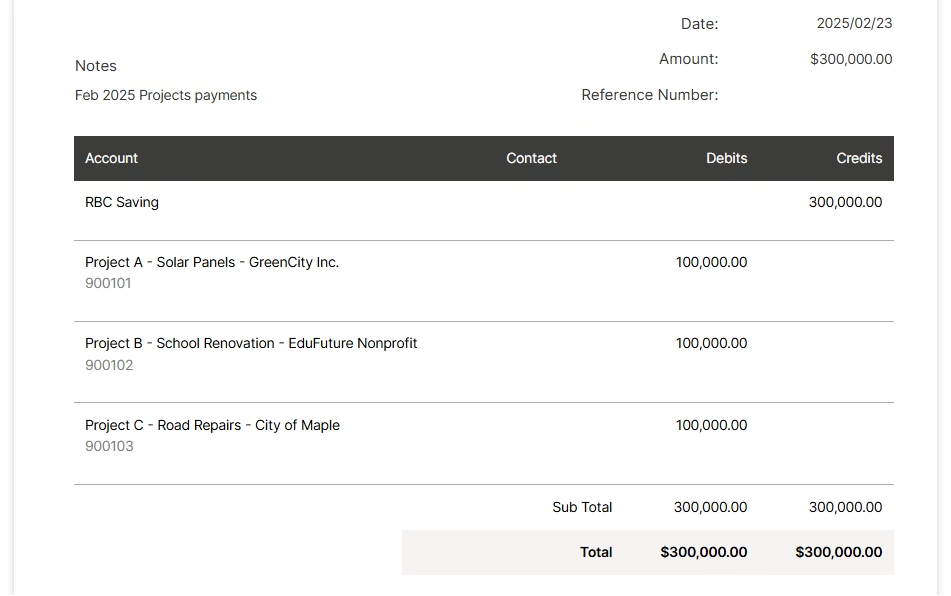
Step 2: System Detects What to Anonymize
Based on your settings (e.g., “anonymize client names”), our plugin scans the document and flags sensitive fields. For this example, it identifies “GreenCity Inc.,” “EduFuture Nonprofit,” and “City of Maple” as items to hide.
Step 3: Replace with Random Identifiers
The system generates unique, random numbers for each sensitive entry:
- “Project A – Solar Panels – GreenCity Inc.” becomes PP-13548425148
- “Project B – School Renovation – EduFuture Nonprofit” becomes PP-58744735418
- “Project C – Road Repairs – City of Maple” becomes PP-84552442168
The revised document now looks like:
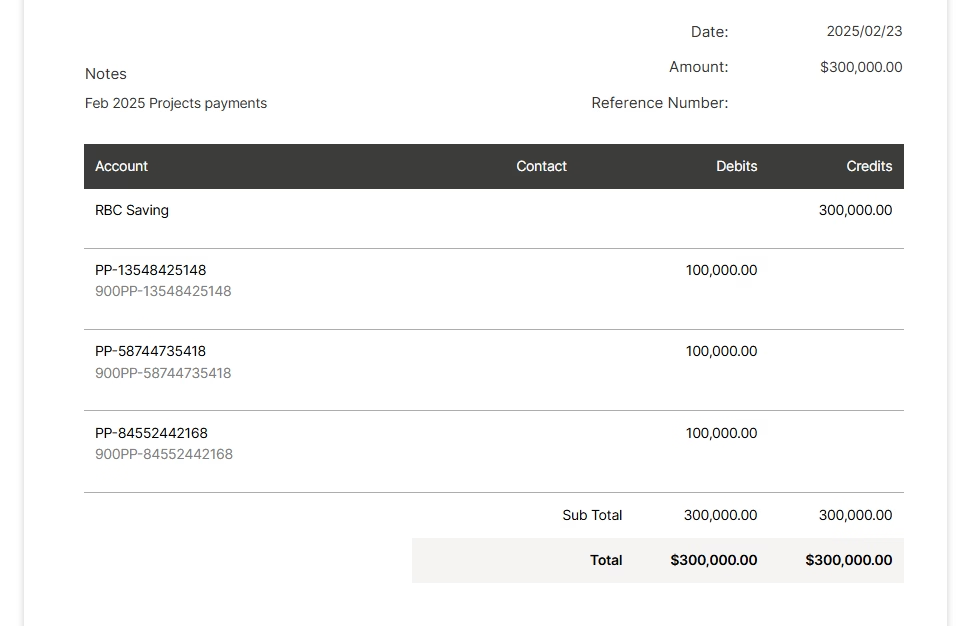
Step 4: Anonymized Document Ready
This new version is what the public or stakeholders see—clear totals and project names for transparency, but no identifiable client info. It’s locked on the blockchain, so no one can alter it.
Step 5: Consistent Mapping for Tracking
We securely store the mapping between original clients and their random numbers (e.g., “Project A – Solar Panels – GreenCity Inc. = PP-13548425148”) with encryption. This mapping stays consistent over time, so the next time you anonymize data, the same numbers are reused. Stakeholders can track transactions for PP-13548425148 across months or years—without ever knowing it’s Project A – Solar Panels – GreenCity Inc..